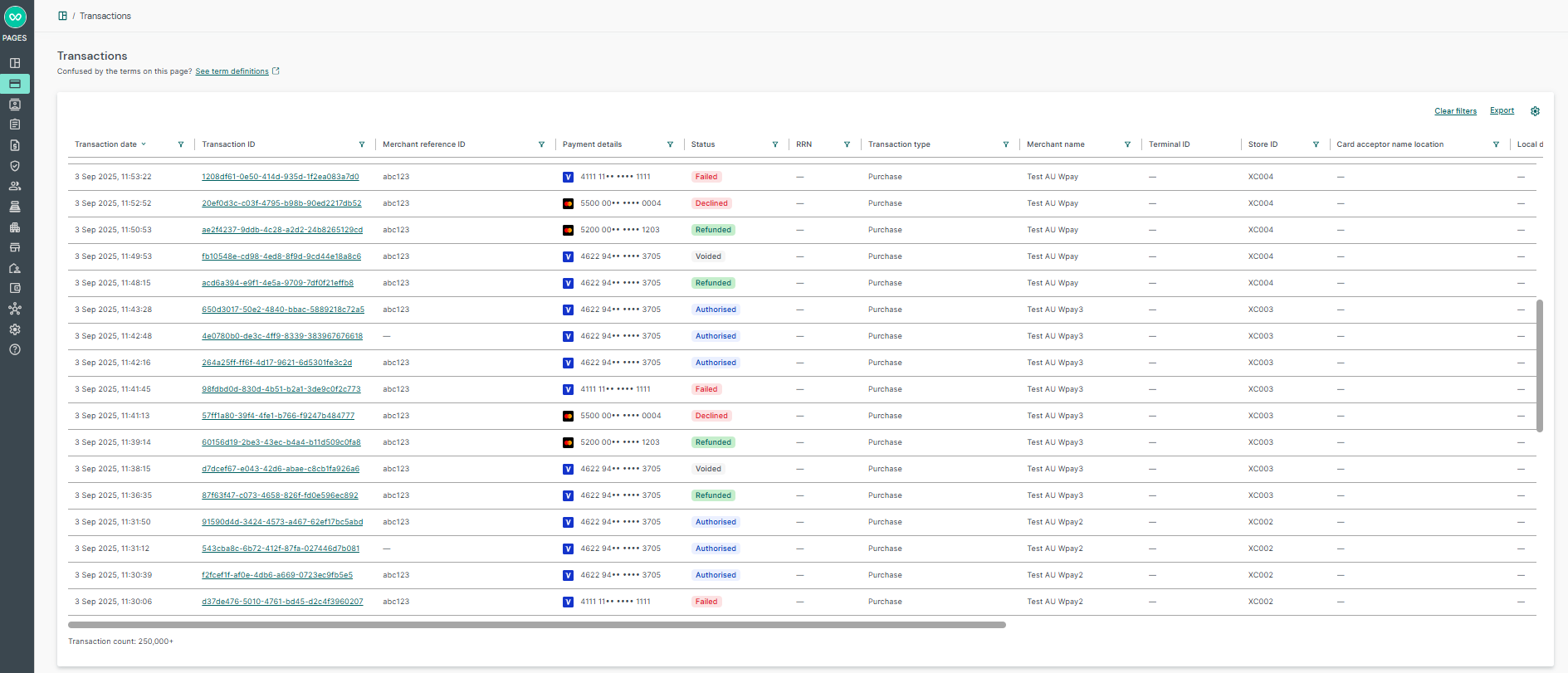
To find your payment transactions, use the built-in search filters in the Payments dashboard. When you perform a search, the payment transactions that match your search criteria will appear and they will be sorted by transaction date in descending order. Each column within the table is sortable, allowing for enhanced navigation. Additionally, you may apply various filters to streamline your search results further.
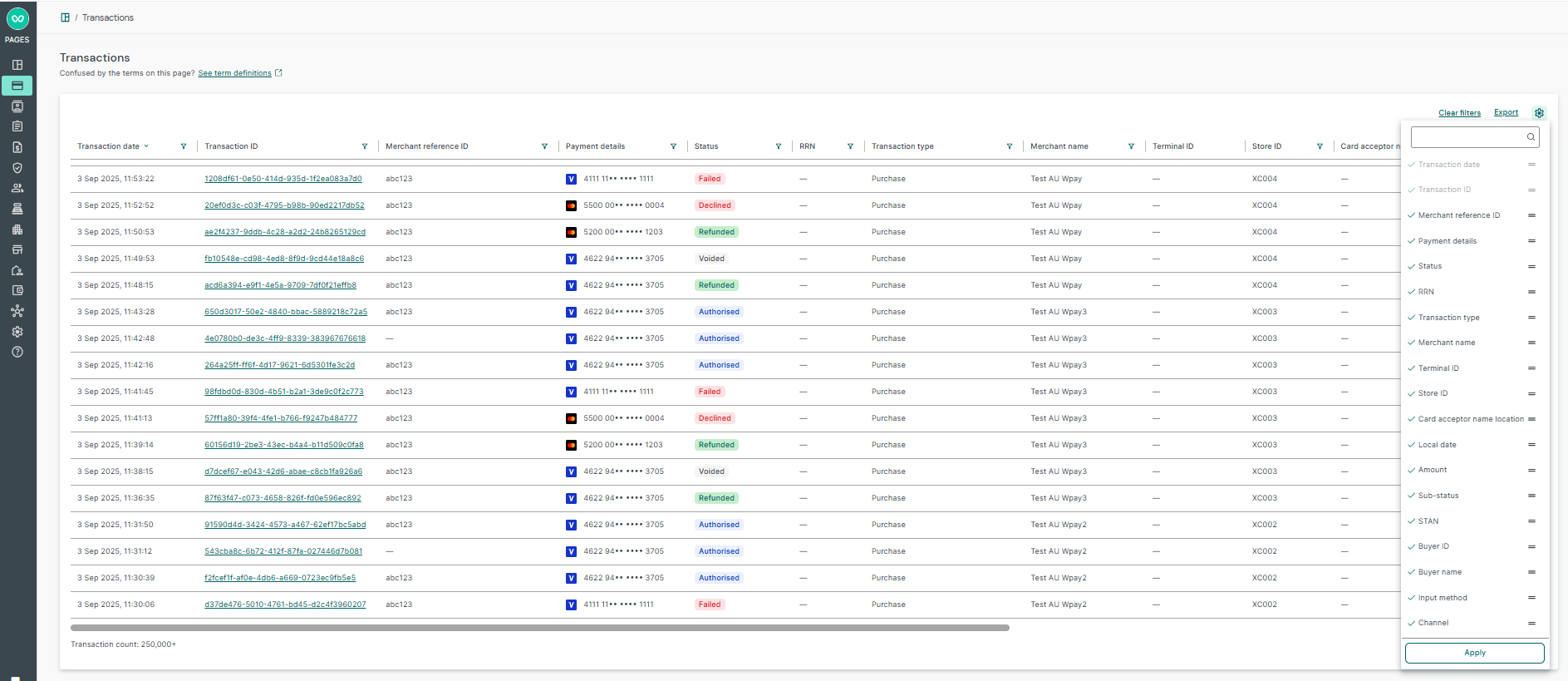
Customise columns
The settings cog from payment listing table allows users to select columns for their transaction search results. To change the column sequencing, click wrap icon next to each column, move and drop it to the intended order. Users can hit apply after selection and transaction listing table will be populated with respective ordering criteria. These users preferences are saved locally for each user for that device.
Filters
The payment dashboard allows users to search for payments using a range of search filters. Some filters may be hidden depending on the type of merchant (in-store / ecommerce), e.g. Buyer filter will be hidden for in-store and shown only for ecommerce merchant.
| Field Name | Description | Applies to |
| Date time range | The transaction date and time range (from and to) in the user's local time. | In-store, Online |
| Transaction ID | Various payment identifiers such as Connect transaction ID, orchestration ID, payment processor ID, and Scheme transaction ID. | In-store, Online |
| Merchant reference ID | The unique merchant-generated order reference or tracking number. | In-store, Online |
| Amount | The total transaction amount (exact and amount range). | In-store, Online |
| Last 4 digits of PAN/DPAN | The last four digits of the credit/debit card (PAN: Primary Account Number, DPAN: Device Primary Account Number). | In-store, Online |
| Merchant name | The list of sub-merchants under the user's tenancy. | In-store, Online |
| Account name | The buyer's account associated with the Alternative Payment Method (APM) or digital wallet (e.g., Afterpay, PayPal). | In-store, Online |
| Currency | The payment currency. | In-store, Online |
| Scheme | The payment scheme (e.g., Visa, Mastercard, JCB). | In-store, Online |
| Payment method | The specific payment method used (e.g., PayPal, Apple Pay, Google Pay). | In-store, Online |
| Status | The main payment status of the transaction. | In-store, Online |
| Card acceptor name location | The store location for in-store transactions or the online payment statement descriptor. | In-store, Online |
| Sub-status | The reason for why the payment was declined or other secondary status details. | In-store, Online |
| Input method | Identifies the source of the transaction (e.g., Ecommerce). | In-store, Online |
| Card type | The specific type of card (e.g., credit card, fuel card). | In-store, Online |
| Channel | An indicator whether the payment was done through the Online or In-store channel. | In-store, Online |
| Transaction type | Identifies the type of the payment (e.g., Purchase, Refund). | In-store, Online |
| Terminal ID | The ID of a payment terminal within a store. | In-store |
| Store ID | The ID of a specific store location. | In-store |
| STAN | The System Trace Audit Number, generated by the cardholder bank to identify an in-store payment. | In-store |
| RRN | The Retrieval Reference Number, a numeric key to uniquely identify a card-based in-store payment. | In-store |
| Buyer | Used to search by buyer ID, first/last/full name, or email. | Online |
| Reconciliation ID | The unique identifier assigned to this payment by the payment orchestration layer. | Online |
Status filtering for multi-tender transactions
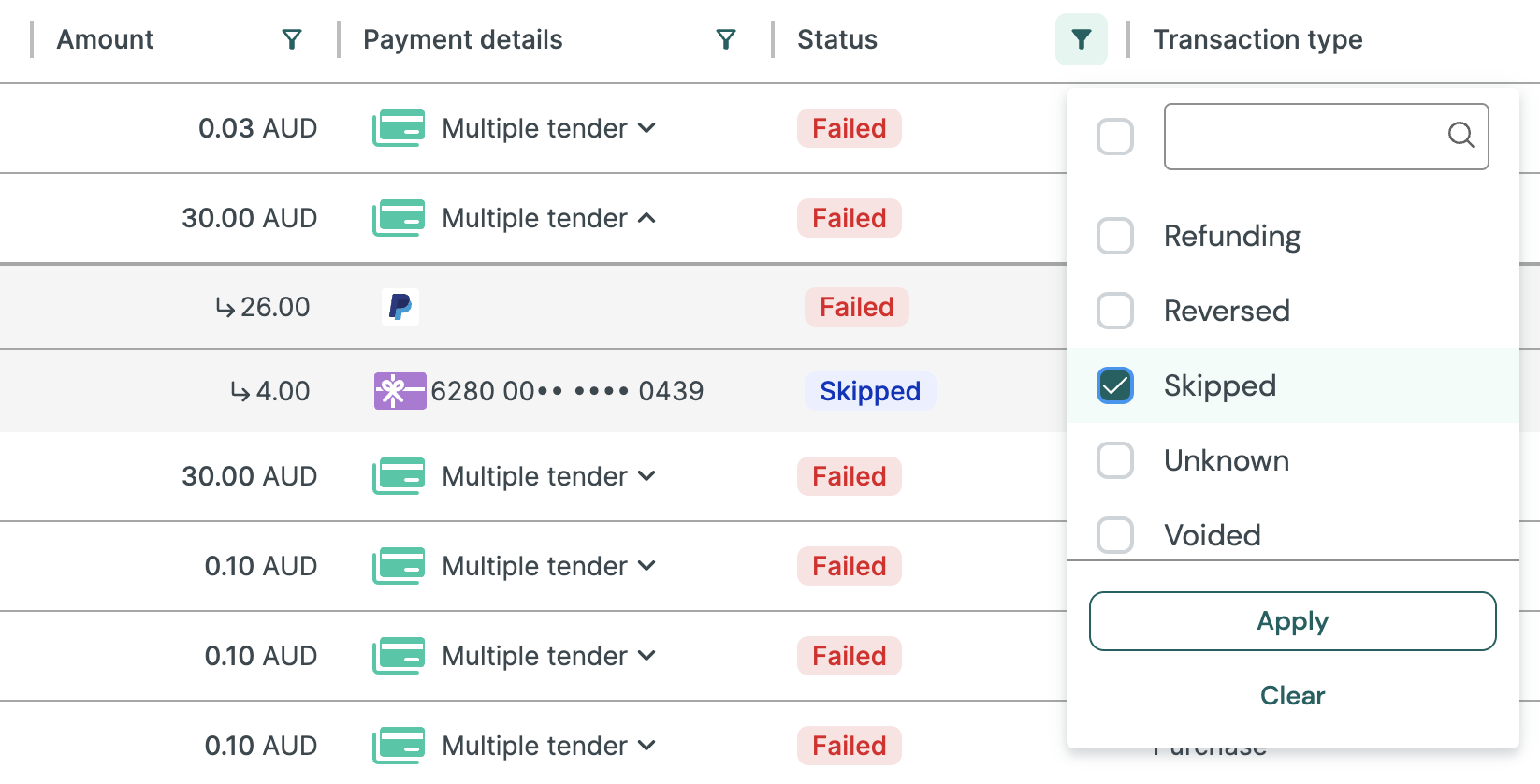
For transactions split between the primary payment method (e.g. card / Paypal) and gift cards, the Status filter applies both to the individual tender within the transaction and to the overall transaction status.
In the example below, filtering by Skipped returns a Failed transaction because the gift card tender underneath it was skipped due to a failure in the primary tender transaction using Paypal.
Additional search filters
You will see search filters based on the channels enabled for the associated merchant account.
Both in-store and online transactions
If the associated merchant account is enabled for both in-store and online, then you will see the channel filter.
Account structure
If the your account is associated with an Account Group or Portfolio Merchant account, then you will see the Merchant filter, where you will be able to filter payments by the Trading account Merchant.Transaction overview
Transaction overview
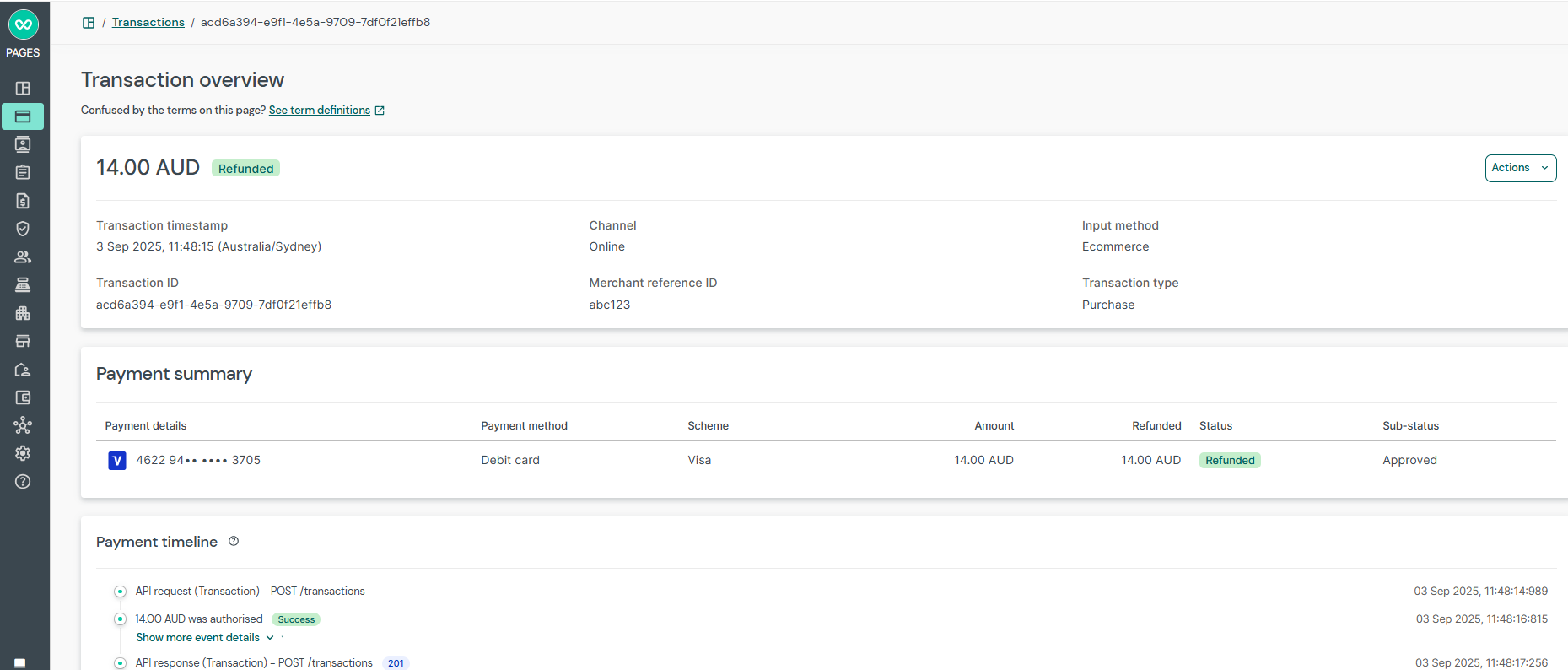
In the Transaction overview page, some fields may not be shown depending on the type of transaction.
Below, you will find the section name, the field names and their descriptions.
| Section / Card | Field Name | Description | Applies to |
| Main | Amount and Currency | The total transaction amount and currency. | In-store, Online |
| Status | The status of the payment. | In-store, Online | |
| Transaction timestamp | Date and time of the payment converted in user's local time. | In-store, Online | |
| Channel | An indicator whether the payment was done through online or in-store channel. | In-store, Online | |
| Card number/Account name | The card number or the email address of the account used for payment. | In-store, Online | |
| Scheme | The card scheme used for payment. | In-store, Online | |
| Payment method | The payment method e.g. PayPal, PayPal Pay in 4, Apple Pay, Google Pay, debit card, credit card. | In-store, Online | |
| Transaction ID | The unique identifier assigned to this payment by Wpay. | In-store, Online | |
| Merchant reference ID | The unique identifier assigned to this payment by the Merchant. | In-store, Online | |
| Transaction type | Identifies the type of the payment (e.g., Purchase, Refund, Reversal). | In-store, Online | |
| Store ID | The unique identifier assigned to the store where payment originated from. | In-store | |
| Local transaction timestamp | Date and time of the in-store payment in the original payment store location. | In-store | |
| Payment timeline | All | This section displays important events associated with the ecommerce payment. | Online |
| Item information | All | This section displays a list of cart items associated with the ecommerce payment. | Online |
| Payment details | Card number | The masked PAN (First six + last four) when a scheme card was used for payment. | In-store, Online |
| Scheme | The card scheme used for payment. | In-store, Online | |
| Payment method | The payment method e.g. PayPal, PayPal Pay in 4, Apple Pay, Google Pay, debit card, credit card. | In-store, Online | |
| Card type | Card type, e.g. credit card, fuel card, etc. | In-store, Online | |
| Expiration | The expiration date of the scheme card used for payment. | Online | |
| Currency | The payment currency. | In-store, Online | |
| Country | The country associated with the payment method used for payment (e.g., country of issuance of the scheme card). | In-store, Online | |
| Card issuer name | Debit or credit card issuer name | Online | |
| Issuer institution name | The name of the financial institution that issued the credit or debit card. | In-store | |
| Issuer institution ID | The ID of the financial institution that issued the credit or debit card. | In-store | |
| Card acceptor ID | The ID of the store/location where payment originated from. | In-store | |
| Merchant details | Merchant name | The name of the merchant that the payment is associated with. | In-store, Online |
| Merchant reference ID | The unique merchant-generated order reference or tracking number. | Online | |
| Order information | Card acceptor name location | The store location or payment origination location. | In-store, Online |
| Input method | Identifies the source of the transaction (e.g., Ecommerce). | Online | |
| Billing details | First name | The first name of the customer paying for the good/service. | Online |
| Last name | The last name of the customer paying for the good/service. | Online | |
| Email address | The email of the customer paying for the good/service. | Online | |
| Phone number | The phone number of the customer paying for the good/service. | Online | |
| House number | The house number of the customer paying for the good/service. | Online | |
| Address line 1 | The address line 1 of the customer paying for the good/service. | Online | |
| Address line 2 | The address line 2 of the customer paying for the good/service. | Online | |
| City | The city or suburb of the customer paying for the good/service. | Online | |
| State | The state of the customer paying for the good/service. | Online | |
| Postcode | The postal code of the customer paying for the good/service. | Online | |
| Country | The country of the customer paying for the good/service. | Online | |
| Organisation | The organisation of the customer paying for the good/service. | Online | |
| Shipping details (if shipping is included as part of the ecommerce transaction) | First name | The first name of the customer receiving the good/service. | Online |
| Last name | The last name of the customer receiving the good/service. | Online | |
| Email address | The email of the customer receiving the good/service. | Online | |
| Phone number | The phone of the customer receiving the good/service. | Online | |
| House number | The house number of the customer receiving the good/service. | Online | |
| Address line 1 | The address line 1 of the customer receiving the good/service. | Online | |
| Address line 2 | The address line 2 of the customer receiving the good/service. | Online | |
| City | The city of the customer receiving the good/service. | Online | |
| State | The state of the customer receiving the good/service. | Online | |
| Postcode | The postcode of the customer receiving the good/service. | Online | |
| Country | The country of the customer receiving the good/service. | Online | |
| Organisation | The organisation of the customer receiving the good/service. | Online | |
| Buyer information | Buyer external identifier | The unique identifier assigned to the online buyer in the merchant's ecommerce platform. | Online |
| Buyer name | The buyer's display name. | Online | |
| Buyer ID | The unique identifier assigned to this Buyer. | Online | |
| Store details | Store ID | The unique identifier assigned to the store where payment originated from. | In-store |
| Card acceptor name location | The store location or payment origination location. | In-store | |
| External merchant store ID | The ID of a specific store. | In-store | |
| Transaction details | Transaction type | Identifies the type of the payment. | In-store, Online |
| Total transaction amount | The total transaction amount and currency. | In-store, Online | |
| Purchase amount | The purchase amount and currency. Applicable for in-store where total transaction amount may differ due to cashout, tip, and surcharge. | In-store | |
| Cashout amount | The cashout amount and currency. | In-store | |
| Tip amount | The tip amount and currency. | In-store | |
| Surcharge amount | The surcharge amount and currency. | In-store | |
| Captured amount | The captured amount for this payment. | In-store, Online | |
| Refunded amount | The total refunded amount for this payment. | In-store, Online | |
| Retrieval reference number (RRN) | A numeric key to uniquely identify a card-based in-store payment. | In-store | |
| Response | Status | The payment status of the transaction. | In-store, Online |
| Sub-status | Reason for why the payment was declined or other secondary status. | In-store, Online | |
| Response code | Response code received from the card issuer, providing reason for decline/failure. | In-store, Online | |
| Description | Description of the response code, providing additional details for decline/failure. | In-store, Online | |
| Error code | An error code set by Gr4vy. | Online | |
| AVS | Response code for Address Verification Service (AVS) check. | Online | |
| CVV | Response code for Card Verification Value (CVV) check. | Online | |
| Scheme transaction ID | The unique identifier assigned to this payment by the card network. | Online | |
| Reconciliation ID | The unique identifier assigned to this payment by the payment orchestration layer. | Online | |
| Service ID | The unique identifier assigned to this payment by the payment gateway. | Online | |
| Banknet reference | Transaction identifier returned for Mastercard and Cybersource transactions by PSP. | Online | |
| Merchant advice code | Provides additional information about the card used. | Online | |
| Anti fraud decision | The mapped decision received from the anti-fraud service (e.g., accept, reject). | Online | |
| Payment account reference (PAR) | The PAR returned by the card scheme. | Online | |
| Card fingerprint | The unique hash derived from the payment method identifier (e.g., card number). | Online | |
| Instrument type | The name of the instrument used to process the transaction (e.g., Apple Pay, Card token). | Online | |
| Acceptance code | The acceptance code of an in-store transaction. | In-store | |
| Recurring | Payment source/Shopper interaction | Denotes the source of the payment (e.g., ecommerce, recurring, card on file). | Online |
| Merchant initiated | Flag indicating if it's a Merchant-Initiated Transaction (MIT). | Online | |
| Subsequent transaction | Indicates if the transaction is a subsequent payment from a recurring/installment setup. | Online | |
| Terminal Information | Network terminal ID | The ID of a payment terminal within a store. | In-store |
| STAN (System audit trace number) | A number generated by the cardholder bank to identify an in-store payment. | In-store | |
| POS card data input method | Card data input method. | In-store | |
| 3DS | Status | The status of the 3DS challenge. Available options: complete, cancelled, declined, etc. | Online (3DS) |
| Method | 3DS authentication method: challenge or frictionless. | Online (3DS) | |
| Version | The 3DS version used for this transaction (e.g., 2.2.0). | Online (3DS) | |
| Authentication response | The response for the 3DS authentication (e.g., Y, A, N). | Online (3DS) | |
| CAVV | The cardholder authentication value or AAV. | Online (3DS) | |
| Directory response | The transaction status received as part of the authentication request. | Online (3DS) | |
| ECI | The ecommerce indicator for the 3DS transaction. | Online (3DS) | |
| Transaction ID | The 3DS transaction identifier. | Online (3DS) | |
| Reason | The reason identifier for a declined 3DS transaction. | Online (3DS v2.2) | |
| Error code | The 3-digit error code. | Online (3DS) | |
| Error component | Code indicating the 3-D Secure component that identified the error. | Online (3DS) | |
| Error description | The error description. | Online (3DS) | |
| Error detail | Detail for the error. | Online (3DS) | |
| Gift card # | Card number | The number for the gift card. | Online |
| ID | The ID for the gift card. | Online | |
| Status | The status of the gift card for the payment method. | Online | |
| Sub-status | The sub status of the gift card for the payment method. | Online | |
| Amount | The amount redeemed for this gift card. | Online | |
| Refunded amount | The amount refunded for this gift card. | Online | |
| Card program group type | The program group type for this gift card. | Online | |
| Card type | The card type for this gift card. | Online | |
| Design code | The design code for this gift card. | Online | |
| Issuer name | The issuer name for this gift card. | Online | |
| Card issuing mode | The card issuing mode for this gift card. | Online | |
| Error code | Error code received from the gift card provider if redemption failed. | Online | |
| Error message | Error message received from the gift card provider if redemption failed. | Online |
3DS Electronic Commerce Indicator (ECI) - Non-Mastercard
| ECI | Transaction Type |
| 05 | 3DS authentication was successful. |
| 06 | 3DS authentication was attempted, but not available through the issuer. A merchant will get this message if the customer is not enrolled in 3DS. This serves as proof the merchant attempted authentication and is classed as successful. |
| 07 | 3DS authentication either failed, not permitted, or could not be attempted. |
3DS Electronic Commerce Indicator (ECI) - Mastercard
| ECI | Transaction Type |
| 00 | 3DS authentication either failed, not permitted, or could not be attempted |
| 01 | 3DS authentication was attempted, but could not be completed. A merchant will get this message if the customer is not enrolled in 3DS. This serves as proof the merchant attempted authentication and is classed as successful. |
| 02 | 3DS authentication was successful. |
| 04 | Data share only, non-authenticated e-commerce transaction, but merchants have chosen to share data via the 3DS flow with the issuer to improve authorisation approval rates. |
| 06 | Transaction is out of scope or exempted from Strong Customer Authentication (SCA). |
| 07 | 3DS authentication was successful for recurring transaction. |
| N0/N2 | Non-payment authentication processed. This type of transaction does not go to authorisation. |
PII Privacy Control
To protect customer data privacy on Connect Portal, Personally Identifiable Information (PII) on the Payments search and Payment details screens is masked by default.
If you require access to the sensitive PII data (such as buyer name, email, phone number, address), please contact your Technical Admin to obtain Personal Information Access Organisation Unit (OU) assigned to your user account.