Overview
An audit log object is typically created & saved per web request. It includes:
- Request & response details (like URL, Http method, Browser info, HTTP status code etc.).
- Performed actions (controller actions and application service method calls with their parameters).
- Entity changes occurred in the web request.
- Exception information (if there was an error while executing the request).
- Request duration (to measure the performance of the application).
How to obtain audit logs for payment actions
In order to obtain audit logs for payment actions such as capture, refund and void, perform the following search.

In the search bar, under Application name type in "TransactionManagement" and update the URL field with the type of action you'd like to search. The options are:
- Refund
- Void
- Capture
You can also search via username. Ensure to use the user's email when searching to see all actions that user has performed.
Please note: For partial refunds and captures, the URL will contain refund or capture. You cannot search explicitly for partial refunds or captures.
Specific payment search
To see specific payments, take the URL of payment from the Payments overview page and paste into the search field. An example is below:
How to obtain audit logs for user log ins
In order to obtain audit logs for user log ins, the application name is AuthServer and the URL is /connect/token. For successful log ins, the HTTP status code will be 200 and the HTTP method will be POST. For unsuccessful logins, the HTTP status code will be 500 and the HTTP method will be POST.
How to obtain audit logs for user updates
Creation and deletion of users
In order to obtain audit logs for updates, the application name is Wpay.Connect.IdentityService.HttpApi.Host and the URL is /api/identity/. These audit logs creation/update/deletion of users.
For successful creation of users, the HTTP status code will be 200 and the HTTP method will be POST. For unsuccessful creation of users, the HTTP status code will be 403 and the HTTP method will be POST.
For deletion of a user, the HTTP status code will be 204 and the HTTP method will be DELETE.
Organisation unit updates
For updates to a users organisation unit, the application name is Wpay.Connect.IdentityService.HttpApi.Host and the URL is /api/identity/organization-units/. For successful updates, the HTTP status code will be 204 and the HTTP method will be PUT. For unsuccessful updates, the HTTP status code will be 403 and the HTTP method will be POST.
Further details in Audit log
To obtain further details under the Audit log, select the detail button and further information will appear:
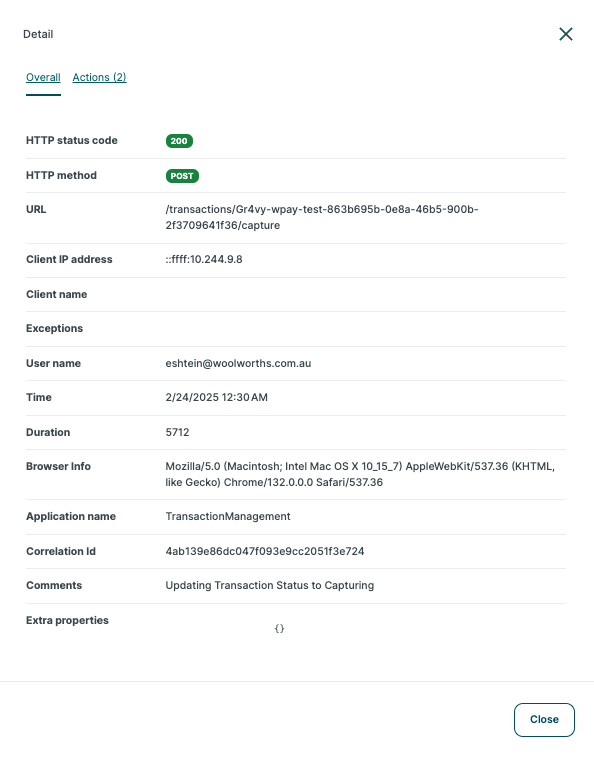
Definitions of the items in the Audit log
| Object | Description |
|---|---|
| HTTP status code | The HTTP response status code for this request (e.g., 200, 404, 500). |
| HTTP method | The HTTP method of the current request (e.g., GET, POST, PUT, DELETE). |
| URL | The URL of the request. |
| Client IP address | The IP address of the client/user device initiating the request. |
| Client Name | The name of the current client, if available. |
| Exceptions | Contains one or more exceptions, allowing you to get a report of the failed requests. |
| User name | The user name of the current user, if the user has logged in. |
| Time | The time when this audit log object was created. |
| Duration | The total execution duration of the request, in milliseconds. Useful for observing application performance. |
| Browser Info | The browser name/version information of the current user, if available. |
| Application name | Used to distinguish logs when audit logs from different applications (or microservices) are saved to the same database. |
| Correlation Id | Used to relate audit logs written by different applications/microservices that belong to a single logical operation. |
| Comments | An arbitrary string value to add custom messages to the audit log entry. |